
Guides · · 11 min read
What is an IFC file? The IFC format and IFC models, explained
What IFC is, who maintains it, what is actually inside an .ifc file — shown with lines from a real one — how an IFC model is structured, the versions and formats you will meet, and what opens one.
An IFC file is a building model written in an open format that no single software vendor owns. Revit, Archicad, Tekla, Allplan and every serious BIM tool can write one and read one, which is the whole point: it is how a model moves between an architect, an engineer, a contractor and a surveyor who do not use the same software. This explains what the format is, shows what is actually inside a real .ifc file, and covers the versions, the variants and what opens one.
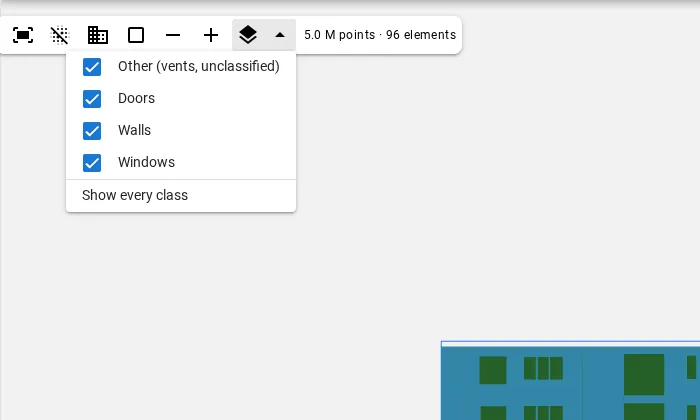
Got a file to look at right now? Our free online IFC viewer opens IFC2x3 and IFC4 in your browser. Nothing is uploaded: the file is parsed on your own machine and never reaches a server. Click any element to read its class, name and GUID — the three things this article is about.
What IFC stands for, and who maintains it
IFC stands for Industry Foundation Classes. It started in 1994, when Autodesk formed an industry consortium to agree a common set of classes for building data. The consortium opened its membership in 1995, became the International Alliance for Interoperability in 1997, and is today buildingSMART International, a non-profit that publishes the specification openly.
The current edition is also an international standard, ISO 16739-1:2024. That status is why public clients can require it: Denmark made IFC compulsory for publicly funded construction in 2010, and a long list of public owners have followed with IFC delivery clauses of their own. A format a client can mandate has to be one that no supplier controls.
Is an IFC file a CAD file?
Not in the sense people usually mean. A CAD drawing stores geometry: lines, arcs, hatches, surfaces. The software draws a wall because someone drew two parallel lines, and nothing in the file knows they are a wall.
An IFC file stores objects. A wall is an IfcWall, a door is an IfcDoor, and each knows which storey it belongs to, which opening it fills and what properties it carries. Geometry is one attribute of each object, not the content of the file. That is what makes an IFC model queryable — “every door on the second floor”, “the total area of glazing” — in a way a drawing is not, and it is why the same file can drive a clash check, a quantity take-off and an energy model.
What is actually inside an IFC file
Open an .ifc file in a text editor and it is plain text. The lines below are taken unedited from a facade model AutoIFC generated from a laser scan, so nothing has been tidied for the article. Every file starts with a header:
ISO-10303-21;
HEADER;
FILE_DESCRIPTION(('ViewDefinition[DesignTransferView]'),'2;1');
FILE_NAME('/dev/null','2026-09-09T20:23:56+00:00',(''),(''),'IfcOpenShell 0.8.5','IfcOpenShell 0.8.5','Nobody');
FILE_SCHEMA(('IFC4'));
ENDSEC;
Three things are worth reading in it. ISO-10303-21 says the file uses the STEP physical file encoding, a format inherited from mechanical engineering. FILE_SCHEMA(('IFC4')) is the version of IFC the file follows — the first thing to check when an import fails. And DesignTransferView is the model view definition, which says which subset of IFC the file uses; more on that below.
After the header comes the data: one numbered entity per line, each referring to others by number. Here is a wall, the opening cut in it, and the door that fills the opening:
#18=IFCWALL('2r3Sno2WLK8eoVh0PlESIt',$,'Wall f00',$,$,#40,#34,$,$);
#2724=IFCRELVOIDSELEMENT('1w2rS8riH6XQnrO4ZOmQhy',$,$,$,#18,#2707);
#2707=IFCOPENINGELEMENT('2ODsD2vN1DcfFM5Dq$Dqzv',$,'Opening Door 1',$,$,#2729,#2723,$,$);
#2730=IFCRELFILLSELEMENT('31lCDHG4j2KOcbmuaoIZTB',$,$,$,#2707,#47);
#47=IFCDOOR('00SKvuPPLRM9$t6nPEQD94',$,'Door 1',$,$,#68,#63,$,$,$,$,$,$);
Read it as a chain. The wall #18 is voided (IFCRELVOIDSELEMENT) by the opening #2707, and that opening is filled (IFCRELFILLSELEMENT) by the door #47. The quoted string at the start of each object is its GlobalId, and $ means a value left empty. The numbers after the name point to the element’s placement and its shape.
Notice that the relationships are objects in their own right, with GlobalIds of their own. IFC does not say “this door is in that wall” as an attribute of either; it records the connection as a separate entity. That is what lets a door be removed and its opening kept, or an opening exist before anyone has decided what fills it.
How an IFC model is structured
Everything in the file hangs off four ideas.
A spatial tree
Every model has one IfcProject, which aggregates a site, which aggregates a building, which aggregates storeys. In the same file:
#15=IFCRELAGGREGATES('0Qj2sJS$T7gevRc9mfedZV',$,$,$,#1,(#12));
#16=IFCRELAGGREGATES('0JecAEaE55kw4ooDYeQSTt',$,$,$,#12,(#13));
#17=IFCRELAGGREGATES('3LC84f1EP6zuJPufONKOiK',$,$,$,#13,(#14));
Project #1 contains site #12, which contains building #13, which contains storey #14. Physical elements are then attached to a storey with IfcRelContainedInSpatialStructure. This tree is why “every door on level 2” is a lookup rather than a guess.
Typed elements
Each physical thing is an instance of a class: IfcWall, IfcSlab, IfcWindow, IfcDoor, IfcColumn, IfcRailing. When nothing more specific fits, there is IfcBuildingElementProxy — a legitimate class for things IFC has no type for, and also, in many exported models, a sign that the exporter did not know what an object was. Counting the proxies in a delivery is a quick test of how carefully it was classified.
GlobalIds that survive re-export
Every rooted object carries a 22-character GlobalId, a 128-bit GUID written in IFC’s own base-64 alphabet — which is why the ones above contain $ and _. A well-behaved exporter keeps the same GlobalId for the same element from one export to the next. That is what lets a second delivery update the objects already in a coordination model instead of duplicating them, and it is the first thing to check when a re-issued model suddenly shows every element twice.
Property sets
Information is attached through property sets. Standard ones are defined by buildingSMART and start with Pset_ — Pset_WallCommon carries fire rating, load-bearing and thermal transmittance — while quantity sets such as Qto_WallBaseQuantities carry lengths, areas and volumes. Anyone can add their own. The door above carries one of ours:
#69=IFCPROPERTYSET('36oZ_i6db1V9mhd715BDsC',$,'Pset_AutoIFC',$,(#71,#72,#73,#74));
#71=IFCPROPERTYSINGLEVALUE('FacadeId',$,IFCLABEL('f00'),$);
#72=IFCPROPERTYSINGLEVALUE('Confidence',$,IFCREAL(0.69999999999999996),$);
#73=IFCPROPERTYSINGLEVALUE('Inferred',$,IFCLABEL('reader,unfitted'),$);
#74=IFCPROPERTYSINGLEVALUE('ReviewState',$,IFCLABEL('PROPOSED'),$);
A custom set like this is how a model carries information the standard never anticipated — here, which facade the element belongs to, how confident the pipeline was, what it had to infer rather than measure, and whether a person has reviewed it yet. Any IFC tool will display it; only tools that know the set will act on it.
Most of an IFC file is not elements
The facade model quoted above describes 96 elements in 3,565 lines and 204 KB. The most common entities in it are not walls or windows but IfcDirection (832 lines), IfcPropertySingleValue (384) and IfcCartesianPoint (333). Placement, geometry and properties outnumber the objects they describe many times over.
That ratio explains two things people run into. The first is file size: a detailed model with tessellated geometry runs to hundreds of megabytes because each element drags a tree of points and placements behind it. The second is speed: a viewer cannot just draw the file, it has to compute each element’s shape from its definition first — which is why opening a large IFC takes noticeably longer than opening a mesh of the same building.
How geometry is stored
IFC allows several ways to describe a shape, and the choice drives both file size and fidelity:
| Representation | Typical entity | What it is | Where you see it |
|---|---|---|---|
| Swept solid | IfcExtrudedAreaSolid |
A 2D profile pushed along a direction | Walls, slabs, simple openings — compact and exact |
| Boundary representation | IfcFacetedBrep |
A closed shell of faces | Irregular shapes, older exports |
| Tessellation | IfcTriangulatedFaceSet |
A triangle mesh, added in IFC4 | Complex or scanned geometry — faithful but heavy |
The wall in our example is the first kind: its shape resolves to an IfcShapeRepresentation marked 'SweptSolid', holding a single IfcExtrudedAreaSolid. Swept solids keep a model light and editable, because a receiving tool can recover the wall’s thickness and height instead of an anonymous block of triangles.
IFC versions: 2×3, 4 and 4.3
| Version | Released | What to know |
|---|---|---|
| IFC2x3 | February 2006 | Still the default export in a great deal of software and the safest common denominator for exchange. |
| IFC4 | March 2013; Addendum 2 TC1 in 2017 | Tessellated geometry, better parametric shapes, a tidier property system, proper georeferencing. The version to ask for when both sides support it. |
| IFC4.3 | Addendum 2 in 2024 | Extends IFC to infrastructure — roads, rail, bridges, ports — and is the edition published as ISO 16739-1:2024. |
IFC4.1 and IFC4.2 were interim releases and have been withdrawn; you should not be asked for either. When a file will not import, check FILE_SCHEMA in its header before anything else — an IFC4 file sent to a tool that only reads IFC2x3 is the most common cause.
Model view definitions
IFC is large, and no exchange needs all of it. A model view definition (MVD) names the subset a file uses for a purpose, and it is written in the header. The ones you will meet:
- Coordination View 2.0 (IFC2x3) — the workhorse of IFC2x3 coordination, and what most IFC2x3 exports claim.
- Reference View (IFC4) — for referencing and coordination: simplified geometry, not meant to be edited.
- Design Transfer View (IFC4) — for handing a model to someone who will keep working on it, with richer, editable geometry. Our example file declares this one.
The MVD matters when a model is going to be edited rather than looked at. A Reference View file opened for editing will feel like a set of dumb solids, because that is what it was exported as.
IFC file formats: .ifc, .ifcXML and .ifcZIP
| Extension | Encoding | Use |
|---|---|---|
.ifc |
STEP physical file, ISO 10303-21 | By far the most common. Everything above is this format. |
.ifcXML |
XML, ISO 10303-28 | Exchange with XML tooling and partial models. Larger than .ifc for the same content. |
.ifcZIP |
A ZIP holding an .ifc or .ifcXML |
Transfer. Unzip it and you have an ordinary IFC file. |
Newer encodings exist — ifcJSON for web applications, RDF using the ifcOWL ontology for linked data, ifcHDF for very large datasets — but in project delivery you will almost always receive an .ifc, occasionally zipped.
What opens an IFC file
Nothing opens one by double-clicking on a clean Windows or macOS machine. What to use depends on what you need to do with it.
To look at it
A browser viewer is enough to check what a file contains, read a GUID, or confirm an export worked before you send it on. Ours reads IFC2x3 and IFC4 without uploading the file. For reviewing a delivery properly — sections, measurements, property inspection — the free desktop viewers go further: BIMvision, BIMcollab Zoom, Solibri Anywhere, usBIM.viewer+ and Open IFC Viewer.
To work on it
- Revit — Insert › Link IFC keeps the model as a live reference and is usually the right choice; File › Open › IFC converts it into Revit elements. The difference, and the export settings going the other way, are in IFC in Revit: link, open and export.
- Archicad, Tekla, Allplan, Vectorworks — import IFC directly.
- SketchUp Pro — imports IFC2x3 and IFC4 natively through File › Import, choosing IFC Files as the format.
- AutoCAD — plain AutoCAD has no IFC import of its own. The Architecture and MEP toolsets do: Open IFC in the application menu, once a drawing is open. They are certified for IFC2x3 and have read IFC4 since the 2019 release.
- Blender — through Bonsai, the open-source add-on formerly called BlenderBIM, built on the IfcOpenShell library — the same library that writes the IFC files AutoIFC produces.
IFC and RVT: open exchange versus native model
RVT is Revit’s native format. It holds the full model as Revit understands it: parametric families, constraints, view settings, everything needed to keep editing. It is proprietary and readable only by Revit.
IFC is an exchange format. Exporting from Revit keeps the objects, their classes, their placement and their properties, but not the parametric behaviour — a door arrives as a door with a size, not as a family whose size drives its frame. That is not a flaw to be fixed; it is the price of a format every tool can read. The practical rule: keep authoring in the native format, exchange and archive in IFC, and do not expect a round trip through IFC to return the model you started with.
The quality of an IFC file is set almost entirely by the exporter and its mapping settings. Two exports of the same Revit model can differ in which elements become proxies, which property sets are written and whether GlobalIds stay stable. When an IFC delivery disappoints, the export settings are the first place to look, not the format.
Where IFC comes from when there is no model yet
Most IFC files are exported from a model someone designed. For an existing building there is often no model at all — only the building. The model then has to be produced from a survey, traditionally by modelling over a laser scan by hand. AutoIFC generates it instead: upload a scan, get an IFC4 model of the facade, with every element measured against the points and reviewed by a person before download. The file quoted throughout this article is one of those, which is why its doors carry a confidence and a review state. What it gets right on a surveyed building is set out on the Accuracy page, and what “level of development” such a model reaches is covered in BIM LOD levels explained.
In short
An IFC file is an open, ISO-standard building model: typed objects in a spatial tree, connected by relationships that are objects themselves, each carrying a stable GlobalId and property sets, with geometry as one attribute among several. Check FILE_SCHEMA and the model view definition in the header when something will not import, keep authoring in your native format, and exchange in IFC. To see all of it in a real file, open one in the free IFC viewer and click an element.
Questions
What does IFC stand for?
Industry Foundation Classes. It is the open data model for buildings maintained by buildingSMART International and standardised as ISO 16739-1, which lets a model move between BIM tools from different vendors.
Is an IFC file a CAD file?
Not in the usual sense. A CAD file stores geometry — lines, arcs, surfaces. An IFC file stores objects, such as a wall, a door or a storey, together with their relationships and properties; geometry is one attribute of each object rather than the content of the file.
What opens an IFC file?
A free viewer to look at it, in a browser or on the desktop, and BIM software such as Revit, Archicad, Tekla, Allplan or Vectorworks to work on it. The free IFC viewer at autoifc.com/ifc-viewer opens one without installing anything, and the file never leaves your browser.
Can AutoCAD open IFC files?
Plain AutoCAD has no IFC import of its own. The AutoCAD Architecture and AutoCAD MEP toolsets do, through Open IFC in the application menu once a drawing is open; they are certified for IFC2x3 and have read IFC4 since the 2019 release.
How do I get an IFC file into SketchUp?
SketchUp Pro imports IFC2x3 and IFC4 natively. Use File › Import and choose IFC Files as the file format.
What is the difference between IFC and RVT?
RVT is Revit's native, proprietary format and holds the full parametric model. IFC is an open exchange format that any BIM tool can read. Exporting from RVT to IFC keeps the objects and their properties but loses Revit's parametric behaviour, so IFC is for exchange and archive rather than a lossless copy.